Inside the Architecture of Matchbox
An AI-Powered Research Matching Platform
Overview
Matchbox is an AI-powered platform that intelligently connects university students with research labs. In traditional settings, students send scattered emails to professors, and researchers manage applications across multiple channels—leading to inefficiencies on both sides. Matchbox centralizes this process: students create profiles and apply to labs, researchers post opportunities and review candidates, and AI handles the matching.
The core use case: a student fills out a profile (skills, coursework, resume), and Matchbox uses AI to recommend suitable research labs. When the student applies, the system evaluates the application and provides the lab with a fit score and detailed reasoning. Researchers can then review incoming applications ranked by AI-generated fit scores and make decisions efficiently.
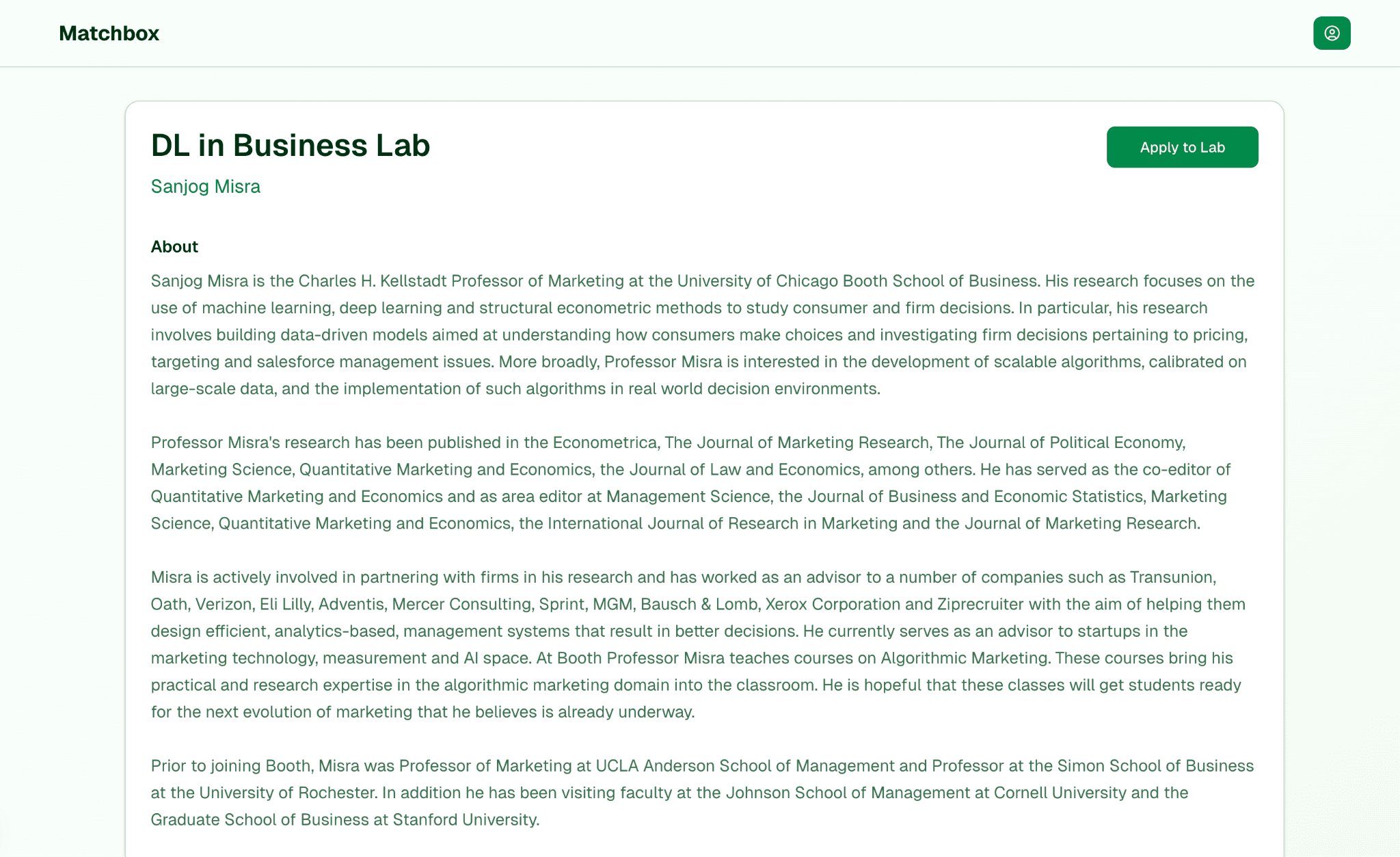
System Architecture
Matchbox follows a cloud-native microservices architecture deployed on Google Cloud Platform (GCP). The core of the system consists of two primary services: a Next.js frontend and a FastAPI backend, both running as serverless containers on Cloud Run. These services are supported by managed cloud services for data storage and processing.
Design Principles
- →Serverless & Scalable: Cloud Run enables automatic scaling from 1 to 100 instances based on traffic, handling spikes while keeping costs low during idle times.
- →Microservices Design: Separation of frontend and backend into distinct services ensures modularity—each component can be developed, deployed, and scaled independently.
- →Managed Datastores: Firestore for structured data, Chroma for vector embeddings, and GCS for file storage—avoiding the overhead of maintaining database servers.
- →Infrastructure as Code: The entire cloud infrastructure is defined using Terraform, ensuring version-controlled and reproducible deployments.
Core Components
Frontend (Next.js 15 + React 19)
The frontend is a Next.js 15 application with React 19 and TypeScript, styled with Tailwind CSS. It runs on Cloud Run as a containerized Node.js service behind a global Cloud Load Balancer, benefiting from edge caching and global routing for low-latency delivery worldwide.
The service maintains at least 1 warm instance and can scale up to 100 instances under load, ensuring fast response times even during peak usage like university application deadlines.
Backend (FastAPI)
The backend is a Python FastAPI application exposing RESTful endpoints for all business logic: authentication, profile management, the matching algorithm, and application processing. It's the computational brain of Matchbox.
Running on Cloud Run with restricted internal traffic only—not exposed directly to the internet—the backend can only be reached through the frontend via internal network routing. This adds a critical security layer. The service scales up to 25 instances, each with 4 CPU cores and 16 GB RAM to support ML workloads.
Service accounts follow the principle of least privilege—for example, the API has datastore.user role for Firestore access, nothing more.
Database (Google Firestore)
Firestore serves as the primary transactional database, storing collections for users, labs, projects, and applications. Its serverless nature and flexible schema accommodated iterative development as the data model evolved. Multi-region replication provides high availability and low read latency globally.
Vector Search Engine (Chroma)
One of Matchbox's standout features is semantic matching. Rather than matching students to labs by exact keywords, the system matches by meaning using vector embeddings.
When labs post opportunities, descriptions are converted into numerical vectors using an embedding model. Student profiles undergo the same transformation. These vectors are stored in Chroma, and when a student seeks recommendations, Matchbox performs nearest-neighbor search in vector space to find semantically similar labs.
This means "machine learning in healthcare" can match with "AI for medical data analysis"—conceptually similar even without shared keywords. Chroma runs on a managed instance group (1-3 VMs) behind an internal load balancer, kept on a private network with no public IP.
File Storage (Google Cloud Storage)
User-uploaded files (resumes, transcripts) are stored in a GCS bucket with object versioning and lifecycle rules for automatic cleanup. Access is secured via IAM—only the Matchbox service account can read/write the bucket. The system performs OCR on resumes upon upload, extracting text so skills and experiences contribute to the matching algorithm.
AI Integration (OpenAI + Embeddings)
The "intelligent" part of Matchbox comes from LLM integration for scoring and feedback. When evaluating a match—student profile against lab project—the system calls the OpenAI API to generate a fit score (1-100) and explanation.
By sending a summary of student and lab information to the model with appropriate prompts, the system ensures scoring considers context and nuance. A student's specific research interest might align with a lab's niche focus in ways keyword matching would miss entirely.
API keys are stored in GCP Secret Manager—never hardcoded—and pulled at runtime via secure IAM bindings. An embedding model (integrated via Hugging Face) generates the vectors for Chroma, combining semantic search with LLM-based scoring for comprehensive AI-powered recommendations.
Networking & Security
Both services are containerized behind a Global HTTPS Load Balancer that terminates TLS using managed certificates. Public traffic reaches only the Next.js frontend; all calls to the API go through internal routing. The backend has no public accessibility whatsoever.
All internal service-to-service calls happen over a VPC connector. Secrets (JWT signing keys, API keys) live in Secret Manager and are accessed at runtime—no sensitive constants in code or config. Authentication uses JWT tokens in HTTP-only cookies, with input validation and CORS rules for cross-origin requests.
Data Flow
Here's how data moves through the system when a student uses Matchbox:
1. Profile Creation
A student signs up and creates a profile on the frontend, filling out forms with education, skills, and uploading documents. The frontend calls the FastAPI backend to save this data. The backend performs OCR on uploaded PDFs, stores structured profile info in Firestore, and generates vector embeddings for Chroma.
2. Lab Posts Opportunity
A researcher creates a lab profile and posts a position. The backend saves structured details in Firestore and generates an embedding vector for Chroma. Now both student and lab vectors exist in a common vector space.
3. AI-Powered Matching
When seeking recommendations, the backend takes the student's vector and queries Chroma for the closest lab vectors via semantic search. For each candidate, it invokes the OpenAI API with student background and lab details, receiving a fit score and explanation.
4. Recommendation Display
The frontend displays a personalized dashboard: "Lab A – Fit 85/100: Your skills in X and Y match what this lab is looking for." Students gain insight into why they're recommended, making the system transparent and actionable.
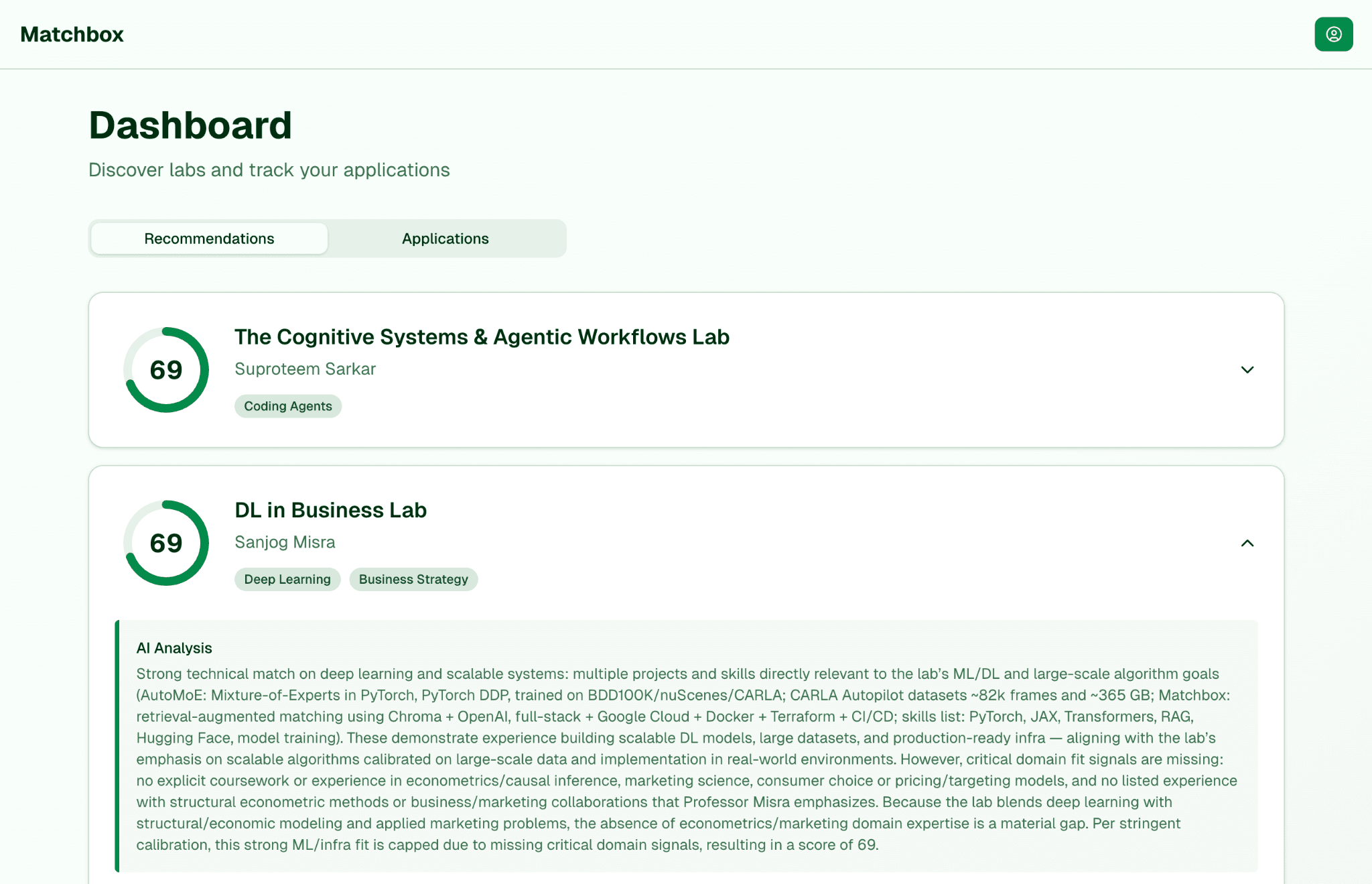
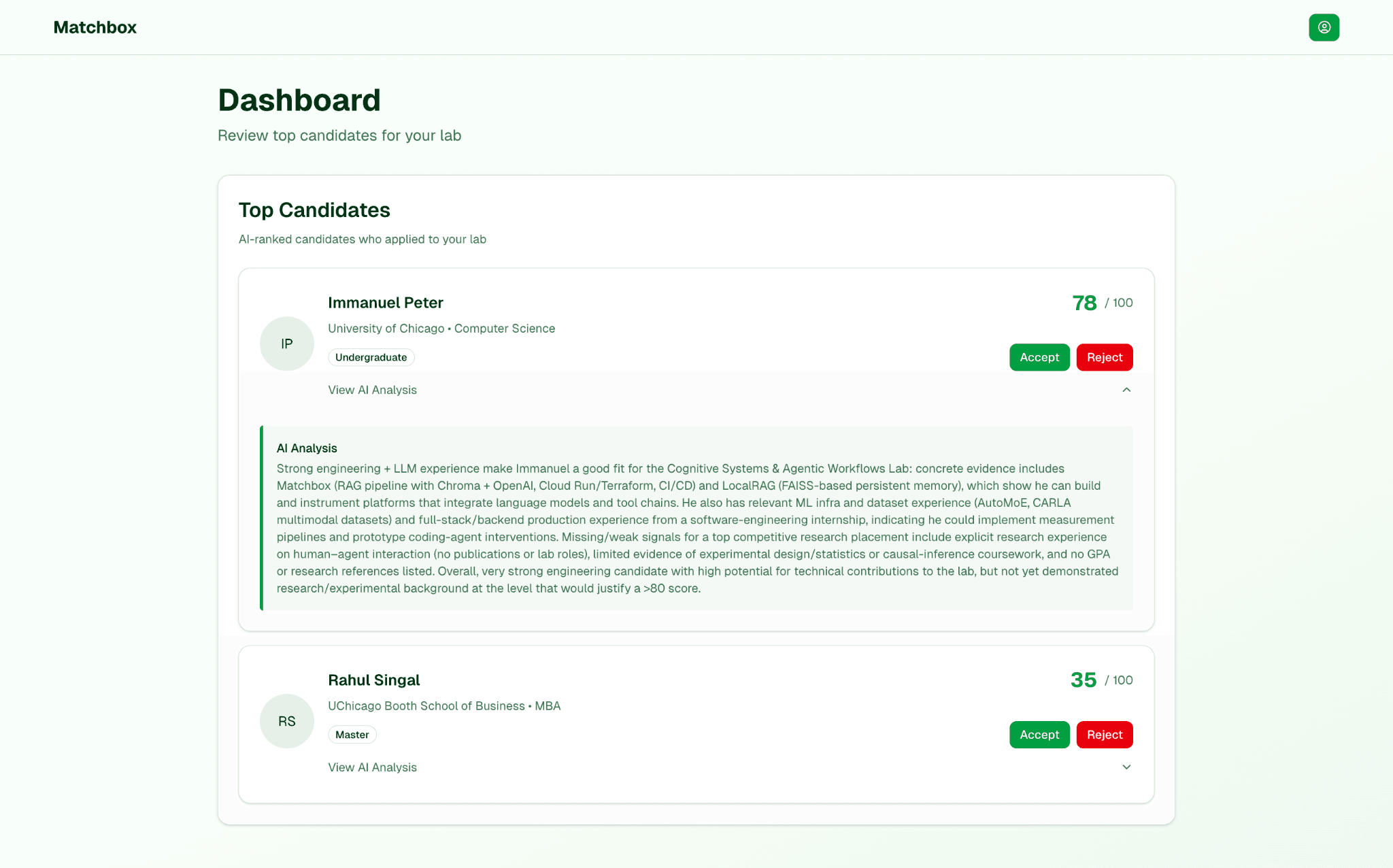
5. Application & Review
When a student applies, the backend records the application in Firestore and generates a final fit score. Researchers see applicants ranked by AI-generated scores with detailed reasoning, helping them prioritize candidates efficiently.
Technical Challenges
Full-Stack Complexity
Building both frontend and backend required proficiency across modern web frameworks in different languages. The integration between them—REST API design, authentication handling, CORS configuration—had to be seamless while optimizing each side independently.
Scale Engineering
Designing for thousands of users meant architecture had to scale gracefully. Auto-scaling parameters were tuned so that sudden load—500 students uploading resumes during a career fair—would spin up enough backend instances for concurrent OCR and scoring. The stateless design (state in Firestore or tokens, not in-memory) makes scaling straightforward.
AI Integration
Each OpenAI API call has latency and cost, so the system caches results where appropriate—not recomputing fit scores if neither profile nor posting changed. Error handling and timeouts ensure good UX even when the AI service is slow.
Security & Privacy
Handling personal data (resumes, academic info) required strong security: proper authentication, HTTPS everywhere, secrets in Secret Manager, role-based data access. A student cannot see another student's data; a lab can only see applications to their own postings. Defense-in-depth with internal-only API services and least-privilege service accounts.
Infrastructure Resilience: A Real-World Test
The value of Infrastructure as Code proved itself dramatically when GCP falsely accused the project of cryptocurrency mining and suspended the entire hosting project without warning. All services went down instantly.
Because the entire infrastructure was defined in Terraform—Cloud Run services, Firestore, VPC configuration, IAM policies, Secret Manager entries, load balancers, everything—recovery was straightforward. I created a new GCP project and ran:
Within minutes, the entire infrastructure was redeployed and operational. What could have been days of manual reconfiguration became a single command. This experience reinforced why IaC isn't just a best practice—it's disaster recovery insurance.
Technology Stack
Frontend
Next.js 15, React 19, TypeScript, Tailwind CSS
Backend
Python, FastAPI, async/await patterns
AI/ML
OpenAI API, Hugging Face embeddings, Chroma vector DB
Infrastructure
GCP Cloud Run, Firestore, GCS, Terraform, GitHub Actions
Security
JWT auth, Secret Manager, VPC, IAM least-privilege
DevOps
Docker, Docker Compose, CI/CD pipelines
Summary
Matchbox represents a complete, production-grade system: cloud-native, scalable, secure, and AI-driven. The architecture combines serverless microservices, vector databases for semantic search, LLM integration for intelligent scoring, and infrastructure-as-code for reproducible deployments. Every component—from the auto-scaling frontend to the internal-only API to the Terraform-defined infrastructure—was designed with production constraints in mind.